> For the complete documentation index, see [llms.txt](https://degen-games-2.gitbook.io/degen-games-docs/llms.txt). Markdown versions of documentation pages are available by appending `.md` to page URLs; this page is available as [Markdown](https://degen-games-2.gitbook.io/degen-games-docs/player-1-press-start/insert-coin.md).
# Insert Coin: Launch a Coin
Launch a coin in 30 seconds. No code, no presale, no team allocation. Every field on the Insert Coin screen, explained.
**Insert coin. Start your own game.**
Launching creates your coin and its bonding curve in a single transaction. The full 1,000,000,000 supply goes straight onto the curve. Nobody gets tokens set aside before trading opens, including you, unless you buy them like everyone else.
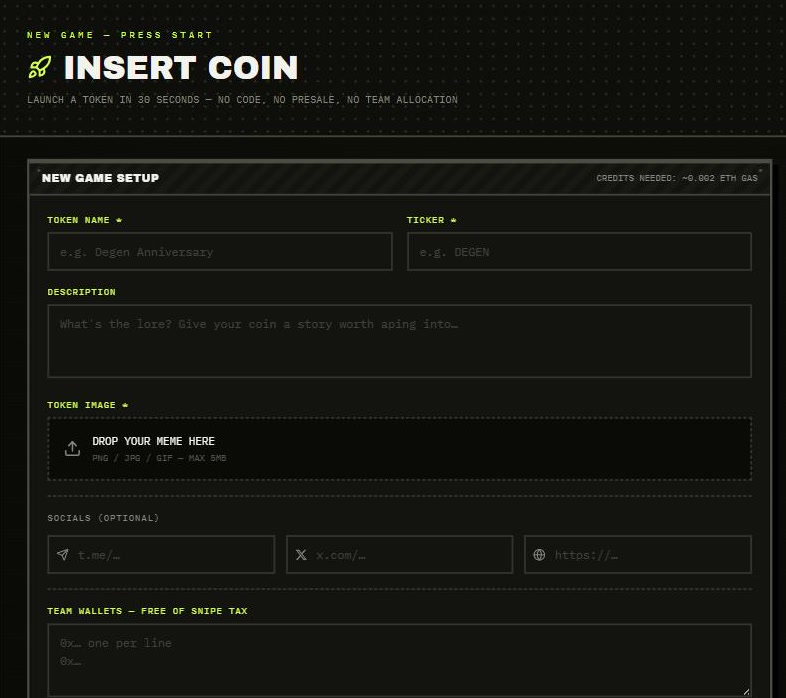
The Insert Coin screen
## What it costs
| Item | Amount |
| ---------- | --------------------------------------------------------------------------- |
| Launch fee | **0.0005 ETH** on Robinhood Chain |
| Gas | A small amount of ETH. The form shows an estimate under **CREDITS NEEDED**. |
| Dev buy | Optional. Whatever you choose to spend on your own coin. |
## Launch in six moves
{% stepper %}
{% step %}
### Connect your wallet
Press **CONNECT WALLET** and make sure you're on the chain you want to launch on. See [Connect Your Wallet](/degen-games-docs/player-1-press-start/connect-your-wallet.md).
{% endstep %}
{% step %}
### Open Insert Coin
Click **INSERT COIN** in the sidebar, or **LAUNCH YOURS** on the home screen.
{% endstep %}
{% step %}
### Fill in the basics
Add a **name**, **ticker**, **image** and optional **description** and **socials**. The **Attract Mode Preview** on the right shows how your coin will look on the Arcade Floor.
{% endstep %}
{% step %}
### Set the rules
Choose your **raise asset**, **creator tax**, **fee recipient**, **team wallets** and **holder rewards**. These are fixed at launch, so read the settings below before you commit.
{% endstep %}
{% step %}
### Add a dev buy (optional)
Buy your own coin in the same transaction that launches it. Nobody can front-run a buy that lands in the same transaction as the launch.
{% endstep %}
{% step %}
### Press INSERT COIN — LAUNCH TOKEN
Confirm in your wallet. When you see **GAME DEPLOYED**, your coin is live on the Arcade Floor.
{% endstep %}
{% endstepper %}
## Every field, explained
### Token name and ticker (required)
The name and the symbol traders will see. Neither is unique. Anyone can launch a coin with the same name. The **contract address** is the only real identifier, so share that.
### Description
The lore. Give your coin a story worth aping into. It's stored with the token on-chain.
### Token image (required)
PNG, JPG or GIF, up to **5 MB**. The image is pinned to IPFS and the chain stores its link. If pinning fails, you can paste an image link instead.
### Socials (optional)
Telegram, X and website. They show on your coin's page and are stored with the token.
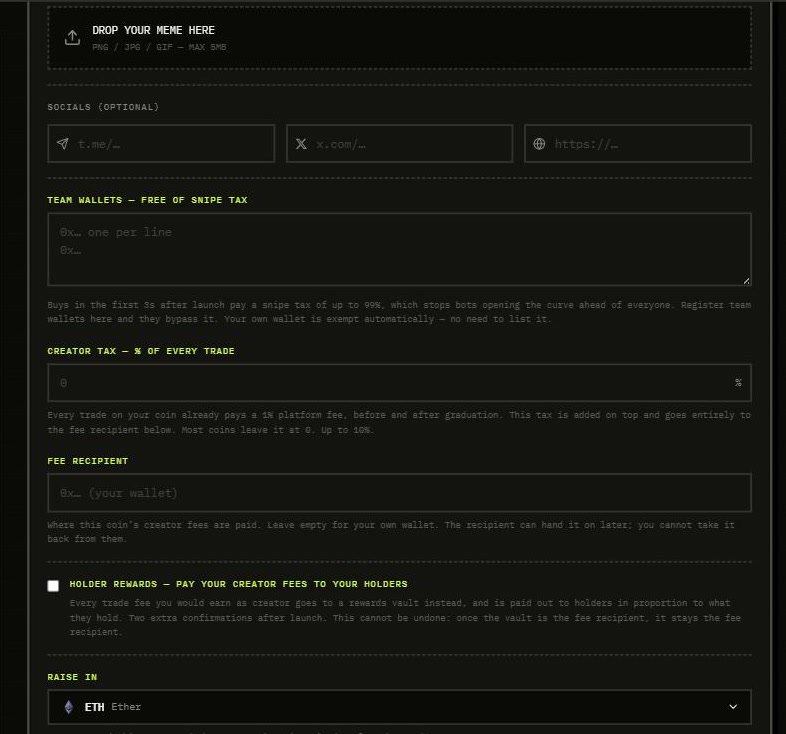
Game rules: team wallets, creator tax, fee recipient, holder rewards, raise asset
### Team wallets: free of snipe tax
Buys in the **first 3 seconds** after launch pay a snipe tax of **up to 99%**. That stops bots from buying the curve before anyone else sees the coin. List your team's wallets here, one per line, and they skip the tax. You can register **up to 31**.
Your own wallet is exempt automatically. So is your fee recipient. The list is fixed at launch and can't be added to later. See [Snipe Protection](/degen-games-docs/how-the-game-works/snipe-protection.md).
### Creator tax: % of every trade
Every trade on your coin already pays a **1% trading fee**, both on the curve and after graduation. You earn **0.7%** of it and the platform earns 0.3%. The creator tax is an **optional extra on top**, anywhere from **0% to 10%**, and it goes entirely to your fee recipient.
* It's fixed at launch. You can't raise it later.
* Traders see it before they trade. Higher taxes put people off, so most coins leave it at 0.
* Example: with a 2% creator tax, a trader pays 3% in total per trade.
See [Fees](/degen-games-docs/how-the-game-works/fees.md).
### Fee recipient
The wallet that earns this coin's creator fees. Leave it empty to use your own wallet.
{% hint style="warning" %}
The fee recipient can hand the fee stream to another wallet later. **You can't take it back from them.** Only set someone else as the recipient if you mean it.
{% endhint %}
### Holder rewards: pay your creator fees to your holders
Tick this and every creator fee you would have earned goes to a **rewards vault**, which pays it out to holders in proportion to what they hold. That covers **both** your 0.7% share of the trading fee and any creator tax you set. It takes **two extra confirmations** after launch: one to create the vault, one to route your fees into it.
{% hint style="danger" %}
Holder rewards **can't be undone**. Once the vault is the fee recipient, it stays the fee recipient forever.
{% endhint %}
See [Holder Rewards](/degen-games-docs/how-the-game-works/holder-rewards.md).
### Raise in
The asset buyers spend on your curve. The curve raises it, graduation seeds the Uniswap pool with it, and you're paid in it.
* **ETH** is the default. An ETH coin graduates at about **4.2 ETH** raised.
* **USDG** graduates at **11,100 USDG** raised.
* **Tokenized stocks** such as AAPL, NVDA, TSLA and SPY each have their own graduation target.
The raise asset is **fixed at launch**. See [Raise Assets](/degen-games-docs/how-the-game-works/raise-assets.md).
### Dev buy: first buy (optional)
Enter an amount to buy your own coin in the launch transaction itself. It's the standard anti-snipe move: you get in before anyone else can. It's added on top of the launch fee, and it's exempt from the snipe tax.
* The form shows how many tokens you'd get.
* The biggest dev buy possible is the whole curve. That fills it and **graduates the coin inside the launch transaction**.
* If you raise in a token such as USDG or a stock, your wallet asks you to **approve** it first.
## After launch
Your coin's page opens while the app picks it up from the chain. It can take a few seconds. From there:
* Share the page link or the contract address.
* Watch trades land in the **Live Feed**.
* Follow the **Road to Graduation** bar as the curve fills.
* Collect your creator fees from **My Profile**. See [Collect Creator Fees](/degen-games-docs/player-1-press-start/collect-creator-fees.md).
{% hint style="info" %}
Once a coin is live, its creator controls almost nothing about it. The supply, pricing, raise asset, tax and graduation terms are all locked in. See [Creator Controls](/degen-games-docs/how-the-game-works/creator-controls.md).
{% endhint %}
---
# Agent Instructions
This documentation is published with GitBook. GitBook is the documentation platform designed so that both humans and AI agents can read, navigate, and reason over technical content effectively. Learn more at gitbook.com.
## Querying This Documentation
If you need additional information that is not directly available in this page, you can query the documentation by asking a question.
Perform an HTTP GET request on the following URL with the `ask` and `goal` query parameters:
```
GET https://degen-games-2.gitbook.io/degen-games-docs/player-1-press-start/insert-coin.md?ask=&goal=
```
`ask` is the immediate question: it should be specific, self-contained, and written in natural language.
`goal` is what the user is ultimately trying to achieve, the reason they need the answer. Sharing it helps GitBook give you a better, more relevant answer. A goal is most helpful when it describes the outcome the user wants rather than restating the question. For example, with `ask=how do I create an API token`, a goal like `automate deployments from our CI pipeline` lets GitBook tailor the answer to that use case.
The response will contain a direct answer to the question and relevant excerpts and sources from the documentation.
Use this mechanism when the answer is not explicitly present in the current page, you need clarification or additional context, or you want to retrieve related documentation sections.